

YouTube is one of the largest content platforms in the world and an essential data source for marketers, SEO specialists, and researchers. Millions of videos are published every day, and many of them appear in backlink profiles, content strategies, and competitor ecosystems.
However, when exporting data from tools like Ahrefs, Semrush, or Majestic, you often end up with long lists of YouTube URLs. These lists alone do not tell you whether the channels behind those links are valuable.
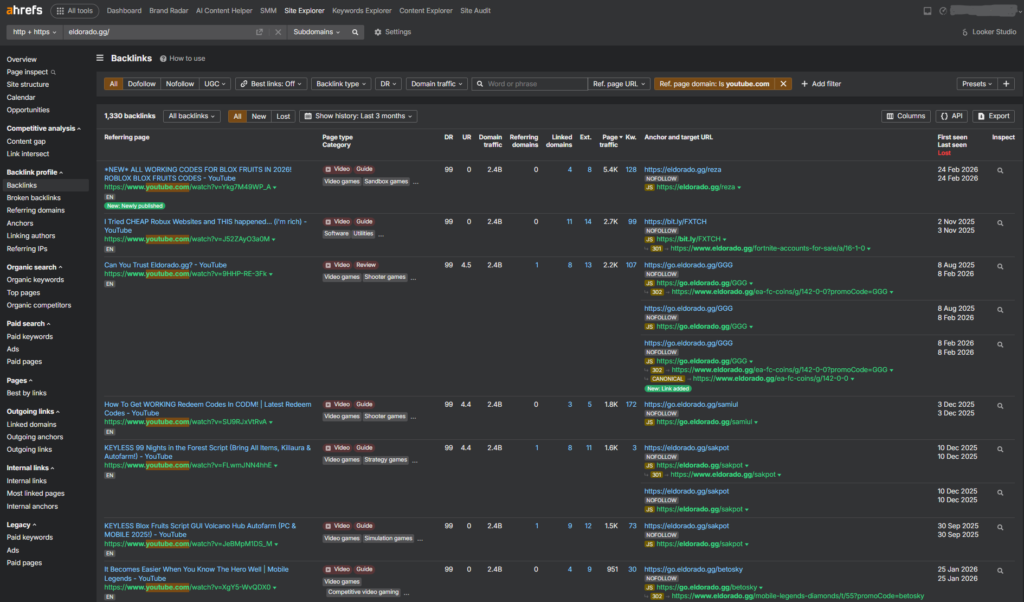
To make informed decisions, you need to understand:
- how many subscribers a channel has
- how many views it generates
- how active the channel is
- and whether it has real influence.
Checking dozens or hundreds of channels manually is inefficient. That is why we built a YouTube Channel Analyzer – a tool designed to automatically collect YouTube channel statistics and help identify the most valuable channels for outreach, collaborations, marketing campaigns, and SEO research.
https://redi.blog/youtube-channel-analyzer.html
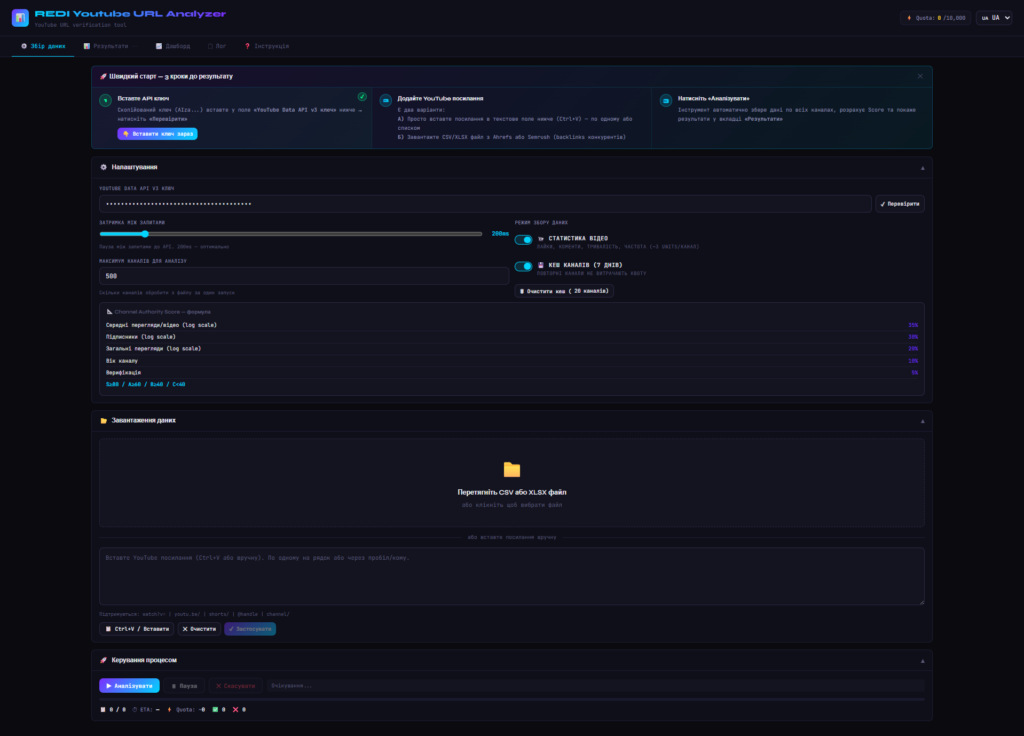
Analyze a YouTube Channel
Enter a YouTube channel or video URL to analyze its statistics.
The analyzer can retrieve:
- subscriber count
- total channel views
- number of videos
- average views per video
- engagement indicators
- channel authority score.
What Is a YouTube Channel Analyzer
A YouTube channel analyzer is an analytics tool that retrieves public YouTube statistics using the YouTube Data API v3.
Instead of manually opening each channel and collecting metrics, the tool automatically gathers key information and organizes it into a structured dataset.
Typical data collected includes:
- channel name and URL
- subscriber count
- channel country
- number of uploaded videos
- total channel views
- channel creation date
- channel description
- channel avatar
- verification status
- channel type
- average views per video.
These metrics help evaluate the authority and reach of a YouTube channel within a specific niche.
Why This Tool Was Created
The idea behind the YouTube Channel Analyzer originated from a practical SEO workflow.
When analyzing competitors or backlink profiles, it is common to encounter many YouTube links. However, those links alone do not answer important questions:
- Is the channel influential?
- Does the channel have real audience reach?
- Is it worth contacting for collaboration or sponsorship?
- Is the channel active and trustworthy?
Without additional analysis, a list of YouTube URLs is simply raw data.
The YouTube Channel Analyzer converts those raw URLs into structured channel insights, making it easier to evaluate opportunities and prioritize outreach.
What Data the Analyzer Collects
The tool retrieves a range of channel statistics through the YouTube Data API v3.
The main data points include:
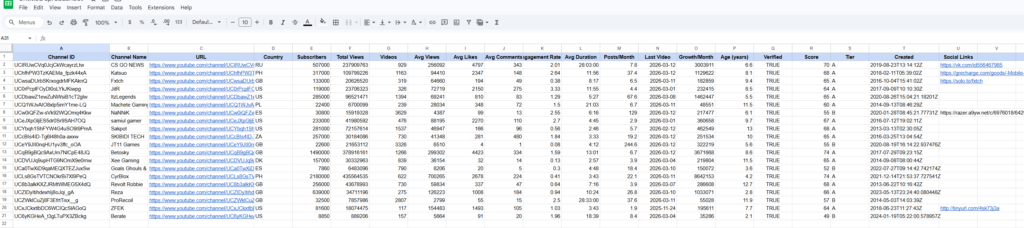
| Metric | Description |
|---|---|
| Channel ID | Unique identifier of the YouTube channel |
| Channel Name | Name of the channel |
| URL | Direct link to the YouTube channel |
| Country | Channel location if available |
| Subscribers | Number of channel subscribers |
| Total Views | Combined views of all channel videos |
| Videos | Total number of uploaded videos |
| Avg Views | Average views per video |
| Avg Likes | Average number of likes per video |
| Avg Comments | Average number of comments per video |
| Engagement Rate | Estimated engagement rate based on interactions |
| Avg Duration | Average duration of uploaded videos |
| Posts per Month | Average publishing frequency |
| Last Video | Date of the most recent video |
| Growth per Month | Estimated subscriber or view growth |
| Channel Age | Age of the channel in years |
| Verified | Whether the channel is verified |
| Channel Score | Calculated Channel Authority Score |
| Tier | Channel classification (S, A, B, C) |
| Created | Channel creation date |
| Social Links | External links listed in the channel profile |
These metrics allow users to evaluate both the size and activity of a channel.
Channel Authority Score
When analyzing large datasets, raw numbers alone can be difficult to interpret. For example, reviewing hundreds of channels manually becomes inefficient.
To solve this problem, the tool calculates a Channel Authority Score from 0 to 100.
The score is based on weighted metrics such as:
| Metric | Weight |
|---|---|
| Subscriber count (log scale) | 35% |
| Average views per video | 30% |
| Total channel views | 20% |
| Channel age | 10% |
| Verification status | 5% |
Channels are then grouped into tiers:
| Tier | Score Range |
|---|---|
| S Tier | 80–100 |
| A Tier | 60–79 |
| B Tier | 40–59 |
| C Tier | 0–39 |
This system helps users quickly identify the strongest channels within a dataset.
How the YouTube Data API Works
Most YouTube analytics tools rely on the YouTube Data API v3, which allows applications to access public information about YouTube channels and videos.
The typical process works like this:
- A user enters a YouTube URL.
- The system extracts the channel ID or video ID.
- API requests are sent to YouTube servers.
- Channel statistics are returned.
- The analyzer processes the data and calculates metrics.
This automated workflow allows large datasets to be analyzed within minutes.
YouTube channel analyzer – does not collect your data for its own purposes, nor does it transfer your data to any third parties.
YouTube API Quota Limits Explained
The YouTube Data API operates under a quota system.
Each API request consumes a certain number of quota units.
Most API projects receive approximately:
10,000 quota units per day.
Examples of request costs:
| API Request | Cost |
|---|---|
| Get video statistics | 1 unit |
| Get channel statistics | 1 unit |
| Retrieve channel videos | 1–5 units |
| Search API request | up to 100 units |
If the quota is exceeded, the API returns the following error:
quotaExceeded
To avoid this problem, the analyzer includes several optimizations:
- batching multiple requests together
- caching channel data
- reducing redundant API calls
- request rate limiting.
These optimizations help conserve quota and allow larger datasets to be processed efficiently.
Also, you can use different Google accounts to create different API keys and increase your quota.
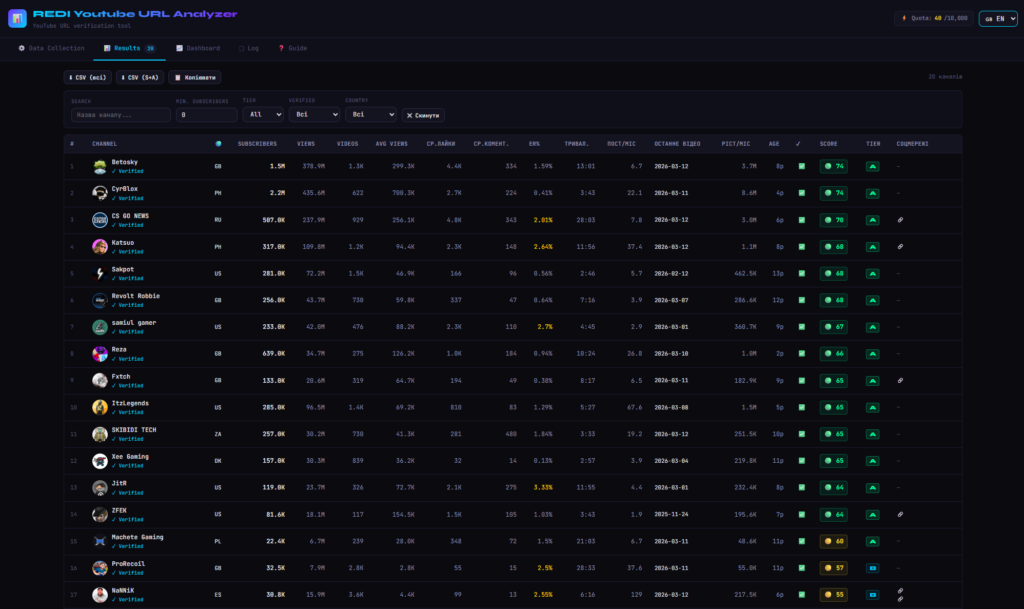
Example Channel Analysis
Below is a simplified example showing how channel data can be compared.
Who Can Benefit from a YouTube Channel Analyzer
This tool is especially useful for professionals working with large datasets of YouTube links.
SEO Specialists
Analyze YouTube backlinks discovered in competitor link profiles.
Outreach and PR Teams
Identify channels suitable for collaborations, sponsorships, or advertising.
Affiliate and Performance Marketers
Discover high-authority channels that may help promote products.
Market Researchers
Understand how competitors use YouTube channels within their content ecosystem.
Why a Scoring System Matters
The biggest advantage of this tool is not simply retrieving YouTube API data.
The real value lies in the decision-support system built on top of the data.
Instead of manually reviewing hundreds of channels, users can:
- prioritize high-authority channels
- eliminate low-value channels
- identify the most promising collaboration opportunities
- structure their outreach strategies.
In other words, the analyzer transforms raw channel statistics into actionable insights.
Limitations of YouTube Channel Analysis
Although YouTube analytics tools provide valuable insights, some data remains private.
External tools cannot access:
- channel revenue
- detailed audience demographics
- watch time analytics
- YouTube Studio internal statistics.
These metrics are only available to channel owners.
Conclusion
The YouTube Channel Analyzer was created to solve a common problem faced by SEO professionals and marketers: evaluating large numbers of YouTube links quickly and effectively.
Instead of manually reviewing each channel, the tool allows users to:
- collect channel statistics automatically
- structure datasets into meaningful insights
- evaluate channel authority
- prioritize outreach opportunities.
By combining YouTube Data API data with scoring and filtering systems, the analyzer helps professionals make faster and more informed decisions.
FAQ
What is a YouTube Channel Analyzer?
A YouTube Channel Analyzer is a tool that collects public YouTube channel statistics using the YouTube Data API and evaluates the authority of channels for marketing, SEO, and research.
Why was this tool created?
It was designed to analyze lists of YouTube URLs exported from SEO tools such as Ahrefs, Semrush, or Majestic and identify the most valuable channels.
What are YouTube API quota limits?
The YouTube Data API uses a quota system where each API request consumes units. Most API keys receive around 10,000 quota units per day.
Why does the analyzer use a scoring system?
The scoring system helps prioritize channels quickly and identify the most influential creators within a dataset.
Who can use this tool?
SEO specialists, marketers, outreach teams, affiliate managers, and researchers who analyze YouTube channel data.